Fill in your journal on screen. Print it. Get signatures at the table.
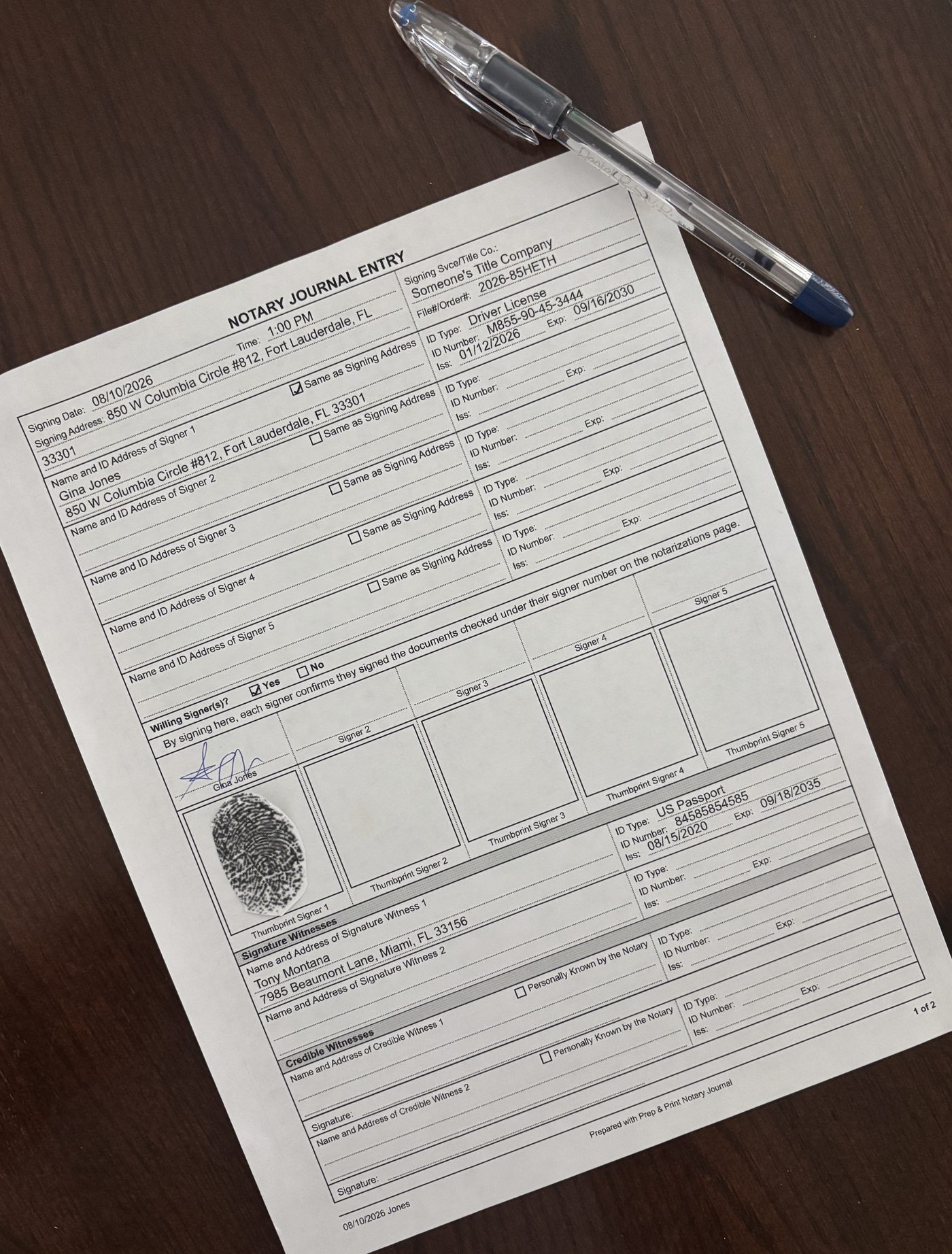
A notary journal you type up before the signing, print on plain letter paper, and take with you. Signers sign the paper the way they always have.
$19. One time. No subscription.
HOW IT WORKS
1. Type in what you already know.
Date, time, place, the documents, the signing service or title company. If the order came with signer names and a file number, put those in too. Whatever you don't have yet, leave blank.
2. Print it.
One click. Standard 8.5 x 11 paper, portrait. Five signers per page, and it adds pages on its own when you have more. The left margin is wide enough for a three-hole punch.
3. Fill in the rest at the table.
Write in the ID details as you check them. Each signer signs on their line, and there's a thumbprint box beside it if you take them.
Your printed pages are the record. The app never asks anyone to sign on a screen.
WHAT'S ON THE FORM
Date, start time, and end time
Where the signing happened
Signing service or title company, and the file or order number
Every document notarized, with the type of notarial act
Signer name, address, and how you identified them
ID type, number, issuing state, and expiration
Signature Witnesses
Credible Witnesses
A signature line for each signer, with a thumbprint box beside it
Your fees, itemized
Notes
Type a title company or signing service once and it's in the list next time.
Signer numbers carry across pages, so a name on page 1 still ties to the documents listed on page 2.
FEES
Set your stamp fee and mobile fee once in Settings and every new entry picks them up.
If you charge a flat mobile fee, print it as one line. If you break it out for the client, list your headings and amounts and the form prints the breakdown. The app adds up the amounts you entered and tells you when they don't match the total you charged.
Raise your rates next year and your old entries keep the fees you actually charged. Nothing rewrites itself behind you.
WHERE YOUR ENTRIES ARE SAVED
Read this part before you buy.
Entries save in your browser, on the computer you use. They never travel to a server. We never see them.
That cuts both ways. Clear your browsing data and they're gone. Switch to a different computer and they don't follow you.
So the app has an Export button. Export writes a backup file to any folder you pick, and Import reads it back. It reminds you every 30 days. Save the file somewhere you already back up and you're fine.
Your link is personal to you. We log when the journal page is opened, to protect against unauthorized sharing. What you type in the journal is never sent anywhere.
If you'd rather have your journal sitting on someone else's server, this isn't the right tool.
WHAT YOU NEED
A computer with Chrome, Edge, Safari, or Firefox
A printer and letter-size paper
A binder or folder to keep the printed pages in order
Works offline once the page has loaded.
BEFORE YOU BUY: CHECK YOUR STATE
Journal rules vary and some of them matter here.
Several states, California among them, require a bound journal with sequential numbered pages. Loose printed sheets don't meet that. This app is not a substitute where a bound book is the law.
Florida doesn't require a journal for traditional notarizations at all. The state recommends keeping one as good practice.
This is built for in-person signings. If you do remote online notarization, your RON platform keeps that record for you and this doesn't replace it.
Look up your own state's requirement first. If your state lets you keep your journal your own way, this works.
WHAT YOU GET
Access to the journal for $19, paid once.
Your personal link arrives by email right after purchase. Open it, bookmark the page, and you can go straight there every time. Updates are included at no extra charge.
If it won't run on your computer, email me within 7 days and I'll refund you.
QUESTIONS
Do signers sign on a screen?
No. Everything is signed in ink on the printed page. That's the point of the app.
Can I print a blank form?
Yes. Print a stack of blanks and fill them in by hand at your desk or on the go.
How many signers fit?
Five per page. Add a sixth and it prints a second page, numbered and carried over.
Can I use it on my phone?
It's built for a computer with a printer attached. You'd be typing a lot on a small screen.
What if I get a new laptop?
Export a backup on the old one, import it on the new one. Your personal link works on the new computer too.
What if I lose my link?
Get it resent anytime at prepandprintnotary.com/resend.
Is my signers' information sent anywhere?
No. It stays in your browser on your machine.
Do I pay again next year?
No. One payment.
What if it doesn't work on my computer?
Email me within 7 days of buying and I'll refund you. It runs in any current browser, but if yours gives you trouble I'd rather give the money back than argue about it.